Is a Web Accessibility Lawsuit Waiting for You Around the Corner? How to Avoid It!

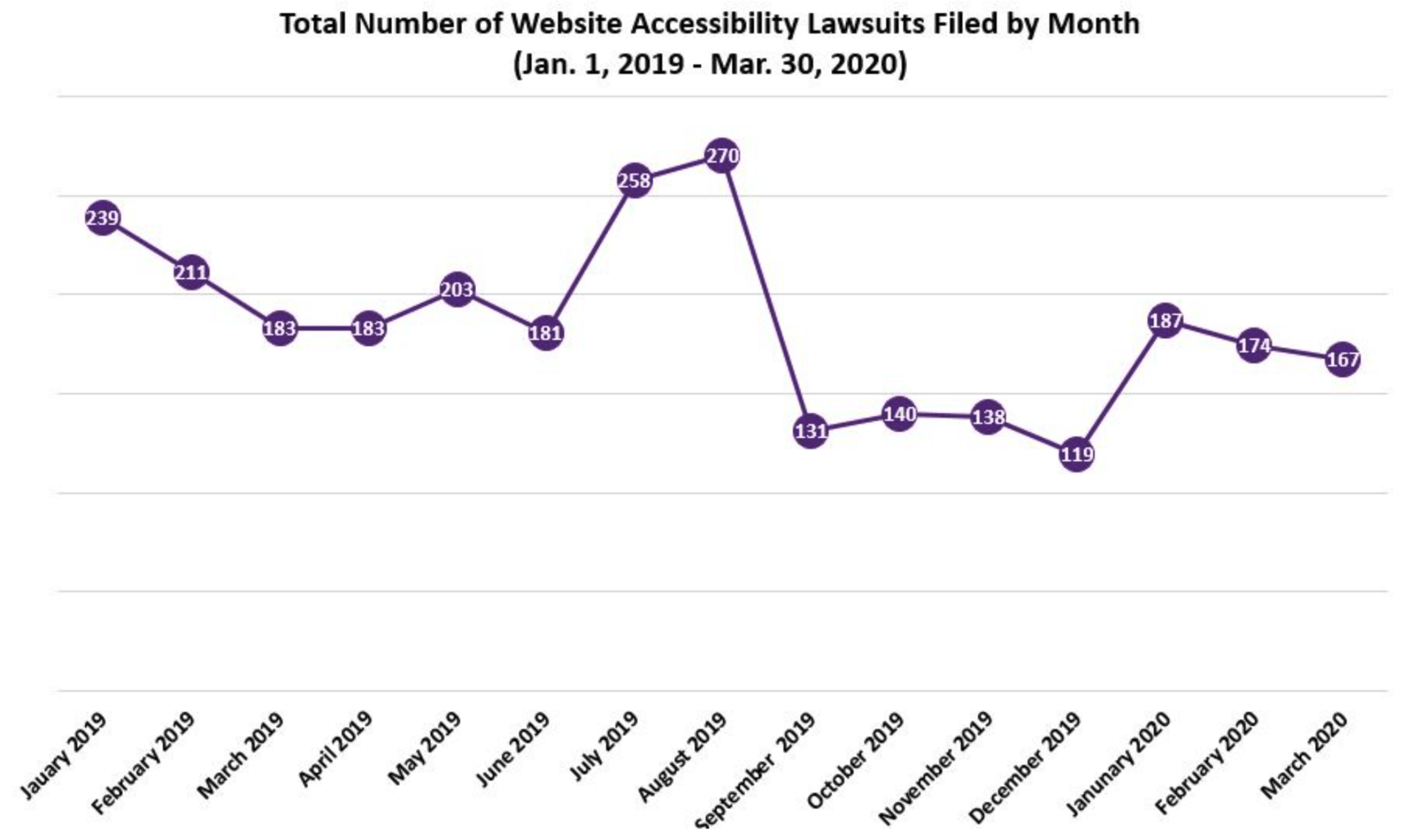
In 2023 alone, over 4,500 federal website accessibility lawsuits were filed in the United States—a staggering number that continues to climb year after year. Small businesses, Fortune 500 companies, educational institutions, and even non-profits have found themselves on the receiving end of demand letters and legal complaints. From Domino’s Pizza facing a Supreme Court battle to Beyoncé’s website being sued for inaccessibility, no one is immune. The message is clear: web accessibility isn’t just a nice-to-have feature; it’s a legal requirement that can cost businesses hundreds of thousands of dollars in settlements, legal fees, and reputational damage if ignored.

But here’s the good news: most web accessibility lawsuits are entirely preventable. The businesses that end up in court aren’t usually those with malicious intent—they’re simply unaware of their legal obligations or haven’t prioritized making their digital presence inclusive. The Americans with Disabilities Act (ADA) has been interpreted by courts to apply to websites, meaning your online storefront, booking system, or informational site needs to be accessible to people with disabilities. This isn’t just about avoiding legal trouble; it’s about opening your doors to the 61 million adults in the U.S. living with disabilities who represent over $490 billion in disposable income.

In this comprehensive guide, we’ll explore the legal landscape of web accessibility, identify the common pitfalls that trigger lawsuits, and provide you with actionable strategies to protect your business while creating a better experience for all users. Whether you’re running an eCommerce site, managing a healthcare portal, or operating a local service business, understanding web accessibility compliance is no longer optional—it’s essential for your survival and growth in the digital marketplace.

Understanding the Legal Landscape of Web Accessibility (ADA and Beyond)

The Americans with Disabilities Act, passed in 1990, was designed to prohibit discrimination against individuals with disabilities in all areas of public life. While the law was written decades before the internet became central to our daily lives, courts have consistently ruled that Title III of the ADA—which covers “places of public accommodation”—extends to websites and mobile applications.

What is ADA Compliance for Websites?

ADA compliance for websites means ensuring that people with various disabilities can perceive, understand, navigate, and interact with your digital properties. This includes individuals with visual, auditory, motor, and cognitive impairments. The gold standard for compliance is the Web Content Accessibility Guidelines (WCAG), developed by the World Wide Web Consortium (W3C). Most courts reference WCAG 2.1 Level AA as the benchmark for accessibility, though these are technical guidelines rather than official U.S. law.

WCAG is organized around four principles, often remembered by the acronym POUR:

  • Perceivable: Information and user interface components must be presentable to users in ways they can perceive (like providing text alternatives for images).
  • Operable: User interface components and navigation must be operable (such as ensuring all functionality is available via keyboard).
  • Understandable: Information and the operation of the user interface must be understandable (like using clear, consistent navigation).
  • Robust: Content must be robust enough to be interpreted reliably by a wide variety of user agents, including assistive technologies.

Legal Precedent and Growing Trends

The landmark Domino’s Pizza case set a crucial precedent when the Ninth Circuit Court of Appeals ruled in 2019 that the ADA applies to websites and mobile apps, even when physical locations exist. The Supreme Court declined to hear Domino’s appeal, effectively letting the lower court’s decision stand. Since then, lawsuit filings have accelerated dramatically.

According to recent data, industries particularly vulnerable to accessibility lawsuits include:

  • eCommerce and retail (over 70% of all cases)
  • Food and beverage services
  • Banking and financial services
  • Travel and hospitality
  • Healthcare providers
  • Entertainment and ticketing

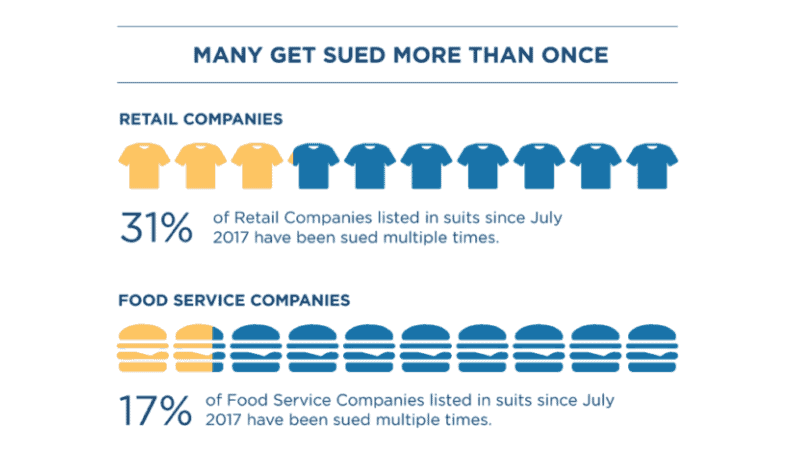
What’s particularly concerning is that businesses of all sizes are being targeted. While large corporations with deep pockets remain prime targets, small businesses and startups have increasingly found themselves facing demand letters requesting settlements ranging from $5,000 to $75,000—often before any formal lawsuit is even filed.

Common Accessibility Issues That Could Land You in Trouble

Understanding what makes a website non-compliant is your first line of defense. The majority of accessibility lawsuits cite similar, recurring issues that are relatively straightforward to fix once identified.

Missing Alternative Text for Images

This is the single most common violation cited in accessibility lawsuits. Alternative text (alt text) provides a textual description of images for screen reader users. When images lack alt text, visually impaired users miss critical information. This is especially problematic for eCommerce sites where product images are essential for purchasing decisions, or informational sites where infographics convey important data.

Inaccessible Forms and Navigation

Forms without proper labels, dropdown menus that can’t be accessed via keyboard, and navigation structures that confuse screen readers create significant barriers. Imagine trying to make a hotel reservation or submit a job application when the form fields aren’t properly labeled—it becomes impossible for assistive technology users to complete these essential tasks.

Poor Color Contrast and Text Readability

Low contrast between text and background colors makes content difficult or impossible to read for users with visual impairments or color blindness. While that light gray text on a white background might look sleek and modern, it fails to meet WCAG contrast ratio requirements and excludes millions of potential users.

Video Content Without Captions or Transcripts

Videos without captions exclude deaf and hard-of-hearing users from accessing your content. Similarly, audio-only content without transcripts presents barriers. This affects webinars, product demonstrations, tutorials, and marketing content.

Non-Responsive and Keyboard-Inaccessible Elements

Many users with motor disabilities rely on keyboards rather than mice to navigate websites. When developers create custom dropdown menus, modal windows, or interactive elements that only work with a mouse, they create insurmountable barriers for keyboard-only users.

The Business Risks of Non-Compliance

The consequences of web accessibility non-compliance extend far beyond the immediate legal costs, affecting your bottom line in multiple ways.

Direct Financial Impact

Settlement amounts in web accessibility lawsuits typically range from $10,000 to $100,000, though some cases have resulted in much higher payments. Beyond settlements, businesses face legal defense costs that can easily exceed $50,000, even when they ultimately prevail. Add remediation costs to fix the accessibility issues, ongoing monitoring, and potential court-ordered compliance audits, and you’re looking at substantial unplanned expenses.

For example, the Gil v. Winn-Dixie case resulted in a judgment requiring extensive website remediation at significant cost. Netflix agreed to caption 100% of its streaming content after facing legal action. These cases set precedents and signal to plaintiff’s attorneys that web accessibility lawsuits can be lucrative.

Reputational Damage and Brand Trust

In today’s socially conscious marketplace, being sued for discrimination—even unintentional discrimination—carries serious reputational risks. News of accessibility lawsuits spreads quickly on social media and can damage your brand’s reputation within your industry and among consumers. Companies that pride themselves on being inclusive, customer-focused, or socially responsible face particular embarrassment when accessibility failures come to light.

Lost Revenue and Market Opportunity

The World Health Organization estimates that over 1 billion people globally live with some form of disability. In the United States alone, people with disabilities have $490 billion in disposable income. When your website isn’t accessible, you’re not just risking lawsuits—you’re actively turning away paying customers. Studies show that 71% of users with disabilities will leave a website that’s difficult to use, and they’re unlikely to return.

How to Proactively Avoid Web Accessibility Lawsuits

The best defense against web accessibility lawsuits is a strong offense: building accessibility into your digital properties from the ground up and regularly auditing for compliance.

Conduct a Comprehensive Accessibility Audit

Start by assessing your current state of accessibility. A professional accessibility audit evaluates your website against WCAG 2.1 Level AA standards and identifies specific violations. While automated tools can catch many issues, they typically identify only 30-40% of accessibility problems. A thorough audit combines automated testing with manual review and testing with actual assistive technologies.

Consider engaging certified accessibility professionals or firms that specialize in digital accessibility. They can provide detailed reports with prioritized remediation recommendations and estimates for fixing issues.

Implement WCAG Best Practices

Once you understand your accessibility gaps, develop a remediation plan. Key areas to address include:

  • Add meaningful alt text: Every image that conveys information needs descriptive alternative text. Decorative images should have empty alt attributes (alt=””).
  • Ensure keyboard accessibility: All functionality must be operable via keyboard alone. Test by unplugging your mouse and navigating your entire site using only the Tab, Enter, and arrow keys.
  • Create proper heading structure: Use H1, H2, H3 tags in logical order to create a content hierarchy that screen readers can navigate efficiently.
  • Label form fields clearly: Every form input needs an associated label element that describes its purpose.
  • Provide sufficient color contrast: Text should have a contrast ratio of at least 4.5:1 against its background (3:1 for large text).
  • Caption all video content: Provide synchronized captions for videos and transcripts for audio-only content.
  • Make links descriptive: Avoid “click here” links; instead, use descriptive text that makes sense out of context.

Train Your Team on Accessibility

Accessibility isn’t a one-time fix—it’s an ongoing commitment. Train developers, designers, content creators, and marketers on accessibility principles and best practices. When your team understands accessibility from the start, you prevent new barriers from being introduced with every website update, new feature, or content addition.

Establish Accessibility Policies and Procedures

Create formal accessibility policies that outline your commitment to digital inclusion. Develop standard operating procedures for testing new content and features before publication. Assign accessibility ownership to specific team members or departments to ensure accountability.

Accessibility Tools and Resources Every Business Should Know

Fortunately, numerous tools and resources can help you achieve and maintain accessibility compliance without breaking the bank.

Free Accessibility Testing Tools

  • WAVE (Web Accessibility Evaluation Tool): A browser extension that provides visual feedback about the accessibility of your web content.
  • Google Lighthouse: Built into Chrome DevTools, it includes accessibility audits in its performance reports.
  • axe DevTools: Offers a free browser extension for automated accessibility testing during development.
  • Color Contrast Analyzer: Helps you test whether your color combinations meet WCAG requirements.

Comprehensive Paid Solutions

For larger organizations or those needing continuous monitoring, consider enterprise-level platforms like Siteimprove, Deque Systems, or Level Access. These solutions provide automated scanning, detailed reporting, remediation guidance, and ongoing monitoring to ensure sustained compliance.

Official Guidelines and Documentation

Familiarize yourself with the WCAG 2.1 guidelines available at W3.org. The WebAIM (Web Accessibility In Mind) website offers excellent tutorials, articles, and resources for understanding and implementing accessibility. The ADA.gov website provides official information about ADA requirements and compliance.

Real Benefits of Embracing Accessibility Beyond Avoiding Lawsuits

While lawsuit prevention is important, the benefits of web accessibility extend far beyond risk mitigation.

Expanded Customer Base and Market Reach

Making your website accessible immediately opens your business to millions of potential customers with disabilities. Additionally, accessibility improvements benefit many other users: older adults with age-related impairments, people with temporary disabilities (like a broken arm), and users in challenging circumstances (like trying to view your site in bright sunlight).

Improved SEO Performance

Many accessibility best practices align perfectly with SEO best practices. Proper heading structure, descriptive link text, alt text for images, and well-organized content all help search engines understand and rank your content better. Accessible websites tend to have cleaner code, faster load times, and better mobile responsiveness—all factors that positively impact search rankings.

Enhanced User Experience for Everyone

Accessibility improvements create a better experience for all users. Clear navigation benefits everyone, not just screen reader users. Video captions help people watching in sound-sensitive environments or those who speak English as a second language. Keyboard accessibility makes your site easier to navigate for power users who prefer keyboard shortcuts. Good color contrast makes your content easier to read in various lighting conditions.

Competitive Advantage and Brand Reputation

Positioning your business as accessibility-forward demonstrates social responsibility and can differentiate you from competitors. Companies that publicly commit to accessibility often earn positive media coverage, customer loyalty, and recognition from disability advocacy organizations.

Moving Forward: Putting Accessibility First

Creating an accessible website isn’t a destination—it’s an ongoing journey that requires sustained commitment and regular attention.

Create a Business-Wide Accessibility Initiative

Make accessibility part of your company culture and values. When accessibility is viewed as a core principle rather than a compliance checkbox, it naturally becomes integrated into all aspects of your digital presence. Celebrate accessibility wins, share success stories, and recognize team members who champion inclusive design.

Monitor and Update Regularly

Technology evolves rapidly, and accessibility standards continue to develop. WCAG 2.2 was recently finalized, and WCAG 3.0 is on the horizon. Schedule regular accessibility audits—at minimum annually, but quarterly is better for high-traffic sites. Test your website whenever you make significant updates, add new features, or implement design changes.

User testing with people who actually use assistive technologies provides invaluable insights that automated tools can’t capture. Consider establishing a testing panel that includes users with various disabilities.

Be Transparent About Your Accessibility Journey

Create an accessibility statement page that outlines your commitment, acknowledges current limitations, and provides contact information for users who encounter barriers. This transparency demonstrates good faith and can actually reduce legal risk while building trust with your audience.

Conclusion: Don’t Wait for a Lawsuit to Take Action

Web accessibility lawsuits aren’t slowing down—they’re accelerating. But the narrative doesn’t have to be about fear and legal compliance. Instead, view accessibility as an opportunity to serve more customers, improve your digital presence, and demonstrate your commitment to inclusion and equality.

The businesses that wait until they receive a demand letter or lawsuit to address accessibility face the most significant costs—financial, reputational, and operational. Those that act proactively not only avoid these risks but position themselves for growth, improved customer satisfaction, and competitive advantage.

Start today by assessing your website’s current accessibility level. Use free tools to identify obvious issues, and consider engaging accessibility professionals for a comprehensive audit. Prioritize the most critical barriers—those preventing users from completing essential tasks like making purchases, submitting forms, or accessing information. Then develop a realistic remediation timeline and commit to making accessibility part of your standard development process.

Remember: every improvement you make, no matter how small, removes barriers and opens your digital doors wider. Your future self (and your legal team) will thank you for taking action now rather than waiting for a lawsuit to force your hand. The question isn’t whether you can afford to prioritize web accessibility—it’s whether you can afford not to.

Leave a Reply